September 29, 2026
You can't hack your way into the inbox anymore, as the old playbook of using warm-up tools and technical checklists is getting domains burned by Google''s AI. This guide shows how to check deliverability correctly by treating your domain as a financial asset, analyzing real human signals in Google Postmaster Tools, and running small, hyper-relevant test campaigns. The only test that matters is getting a real person to open and reply to your email, proving genuine engagement over fake metrics.
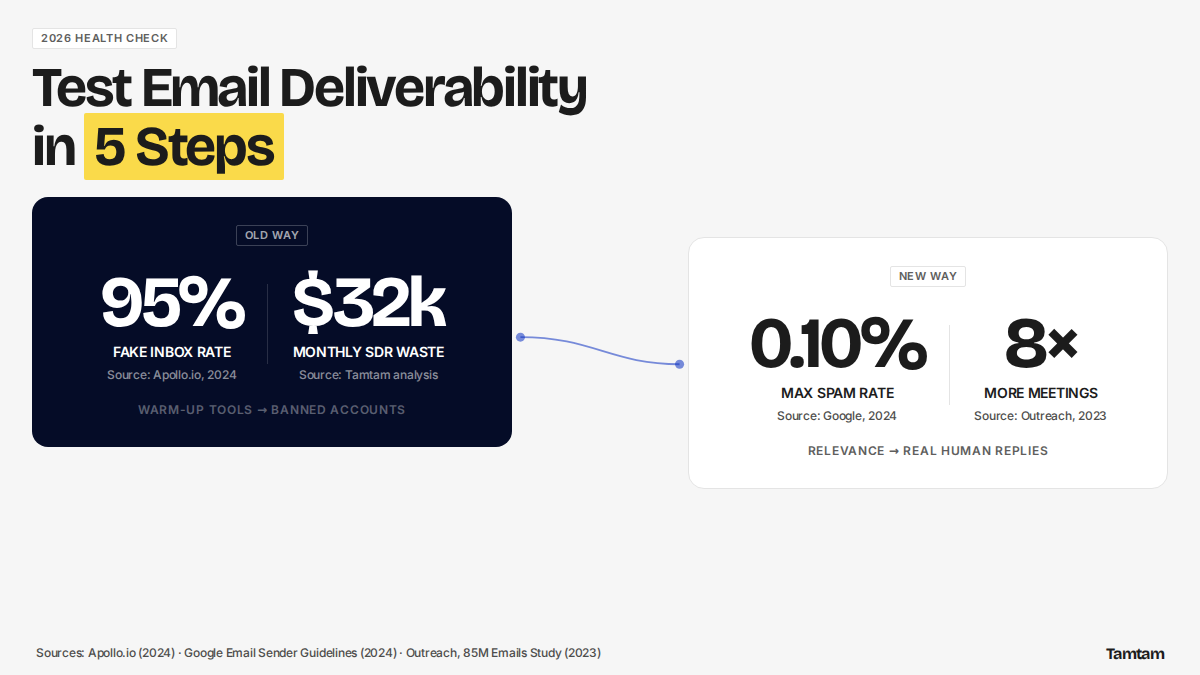
Most sales teams test deliverability by looking at a dashboard in a warm-up tool. It gives them a nice, comforting 95% inbox rate while their actual emails are rotting in spam folders, never to be seen by a human eye. You’re grading your own homework in a fantasy land, paying for the privilege of being lied to.
The truth is, since the big Google and Yahoo updates in early 2024, these tools have become liabilities that can actively get you penalized. The game has changed. For a decade, sales teams tried to outsmart the spam filter. Now, the spam filter is outsmarting them.
If you’re still relying on the old playbook, you’re not just failing to get meetings. You're systematically destroying one of your company's most valuable assets. It’s time to stop guessing and start measuring what actually matters.
Before you touch a single tool or check a single setting, you need a radical mindset shift. Stop thinking of deliverability as a technical score or a campaign metric.
It’s your company's digital credit score. It’s a financial asset on your balance sheet.
Every relevant, well-targeted, engaging email you send is a deposit. It builds reputation and trust with inbox providers. Every lazy, high-volume, "just checking in" blast is a massive withdrawal. It erodes trust and flags you as a nuisance.
When you burn a domain, the consequences are catastrophic. It's not just that your SDRs' emails go to spam. It’s your CEO's emails to investors. It’s your finance team's invoices to customers. It’s your product's password reset emails. The cost isn't $15 for a new domain. It's tens of thousands of dollars in wasted salary and lost pipeline.
Think about it. A five-person SDR team costs roughly $32,000 per month in salary and overhead. If your domain is burned for even one month, you’ve vaporized $32,000 paying people to shout into a void. That doesn't even begin to account for the lost deals that never entered the pipeline. This isn't a marketing problem; it’s a C-level financial problem.
Common Mistake to Avoid: Thinking subdomains like sales.yourcompany.com will save you. It’s a myth. Google’s own documentation is clear: reputation is primarily calculated at the organizational domain level. The rot from a burned sales subdomain will infect your entire company's ability to communicate. You can’t quarantine this kind of damage.
Okay, with the existential dread properly established, let's get the basic technical shit out of the way. This part doesn't guarantee you land in the inbox, but botching it guarantees you land in spam. Think of this as getting a driver's license. It makes you legally able to drive, but it doesn't mean you're any good at it. Inbox providers like Google and Microsoft expect you to have this handled. You earn zero bonus points for doing it right, but you get instantly penalized for doing it wrong.
Your goal here is simple: prove you are who you say you are.
p=quarantine, which suggests sending failed emails to the spam folder. An even better setting is p=reject, which tells them to block the email entirely.Common Mistake to Avoid: Setting this all up once and thinking you're "done" with deliverability. This isn't a one-time setup. This is step zero. It’s the cost of entry. The real work, the stuff that actually determines whether you're seen as a trusted sender or a spammer, starts now.
The multi-million dollar email warm-up industry is built on a simple premise: tricking spam filters by faking engagement. These tools put your email account into a network of other accounts (mostly bots) that automatically send, open, reply to, and mark each other's emails as "important." For years, this created enough positive signals to fool basic filters.
Those days are over.
In 2024, Google's AI is specifically designed to detect this exact pattern of non-human, cloud-based interaction. It sees thousands of accounts, all hosted on the same cloud servers, all interacting with each other in predictable, robotic ways. Your warm-up tool dashboard shows a glorious 95% open rate, but Google’s systems see bots talking to bots, completely ignore the signal, and flag your account for suspicious, manipulative activity.
You're not tricking Google; you're handing them a signed confession.
We’ve seen horror stories of sales teams having dozens of accounts permanently banned in a matter of weeks because the AI detected the warm-up tool's fake activity. It's not a coincidence that major sales platforms like Apollo.io publicly killed their own warm-up features in 2024, stating that they "can no longer be recommended as a safe and effective way to prepare for cold emailing." They saw the writing on the wall. The tools designed to help you are now actively hurting you.
Common Mistake to Avoid: Seeing a dip in deliverability and increasing the intensity of your warm-up tool. This is the equivalent of getting a speeding ticket and then slamming the accelerator to 120 mph. You're just telling the algorithm, "Yep, I'm definitely the spammer you're looking for." Turn it off. Rip the band-aid off. Your real reputation is all you have.
So if warm-up tools are a lie, how do you know what your reputation really is?
You stop guessing and go to the source. The only test that matters is how real humans in your target accounts react to your emails. And the only place to get that data, unfiltered and direct from the source, is Google Postmaster Tools.
This is Google's free diagnostic tool for senders. It tells you exactly what its systems think of you based on how actual Gmail users interact with your emails. It is your single source of truth.
postmaster.google.com, add your domain, and verify it by adding a TXT record to your DNS. It’s a simple, one-time setup.Why This Works: You are no longer operating on assumptions or vanity metrics from your sequencing tool. This is direct, unfiltered feedback from the world's largest inbox provider. It reflects reality, not the artificial sandbox of a warm-up network. It’s the difference between asking your friend if your new haircut looks good and seeing a candid photo of yourself from the back. One is polite fiction; the other is brutal, actionable reality.
Common Mistake to Avoid: Ignoring Postmaster Tools because the data is delayed by a day or two. That delay is completely irrelevant. You are not looking for real-time alerts to triage a single bad campaign. You are looking for trends over time to manage the health of a core business asset.
So, how do you actually test your deliverability in this new world?
By doing your job. Just on a smaller, more controlled, and much, much smarter scale. You run a diagnostic micro-campaign.
Here's how it works:
How to Interpret the Results:
This approach forces you to behave like a top-performing rep. An Outreach study of 85 million sales emails found that the top 1% of reps get 8 times more meetings not from sending more emails, but from extreme relevance and personalization. This micro-campaign isn't just a test; it's practice for the only type of sales that works anymore.
Common Mistake to Avoid: Sending this test campaign with the same old generic template you've been using for years. The entire point of this diagnostic is to send something so obviously valuable and well-targeted that it can't be mistaken for spam. If you use a bad template, you're not testing your domain's health; you're just proving your emails suck.
The game has changed. You can’t win by trying to fake human engagement. You can only win by creating it. This micro-campaign approach is the new standard, but it also reveals the real bottleneck in modern sales: the immense manual labor required to build a list so good that a spam complaint is impossible. The old game was about volume; the new game is won or lost during the research phase, long before you ever click send. It’s a fundamental shift, moving from buying static data to building dynamic lists around the buying triggers that companies like Tamtam are now obsessing over.
Set up for you before our first call
Book a demo